The Fediverse Wiki
The Fediverse Wiki
  • Tools
    • User Tools
    • Log In
    • Site Tools
    • Media Manager
    • Page Tools
    • Back to top

  1. You are here
  2. Home
  3. Vernissage
  4. User Guide
  5. introduction

  • Back to top

Below is a screenshot of Vernissage's home page where you can see main Timeline:
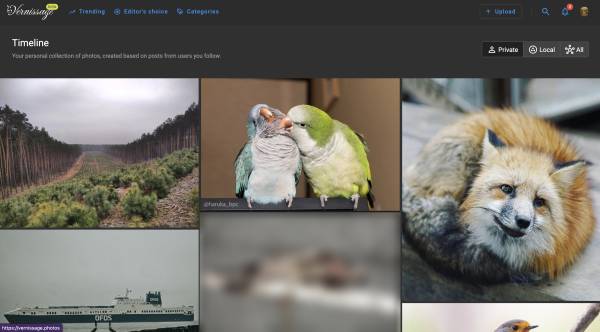
You can find here following menu items:

  • Trending,
  • Editor's choice,
  • Categories,
  • Upload,
  • Search,
  • Notifications,
  • Personal.

Below the main menu but above timeline you have three options:

  • Private,
  • Local,
  • All.

Next you have gallery of pictures called Timeline, click on one of the images leads you to the Post page.

  • Last modified: 13 February 2025 21:55
  • by @bluszcz@mastodon.art

cc by nc sa

Except where otherwise noted, content on this wiki is licensed under the following license:
CC Attribution-Noncommercial-Share Alike 4.0 International